
Leasing Checkout Integration: How to Embed Leasing Options Seamlessly in Your Store
Sofia Rangoni

Mar 13, 2026
What Is Leasing Checkout Integration?
Leasing checkout integration means giving shoppers the option to lease products, instead of buying them outright, right from your online store’s checkout page. Instead of redirecting shoppers elsewhere or sending them through a clunky approval process, the leasing choice is smoothly woven into your existing checkout flow. This way, customers can select lease terms in just a few clicks while reviewing their cart, no extra logins or forms required.
Think of it as adding a “lease it” button next to “buy now”: the shopper picks leasing, sees real-time pricing and approval, and completes the order all in one place. For the merchant, this requires connecting your checkout system with a leasing provider using tools like APIs, plugins, or custom widgets, so everything feels part of a unified shopping journey.
Benefits for Merchants
Enabling leasing at checkout can open the door to bigger carts and a wider audience. By making high-ticket items more affordable with monthly payment plans, you can reduce sticker shock, boost conversion rates, and even encourage repeat business. Leasing options can also help you stand out in a crowded market, attracting customers who might otherwise walk away due to up-front costs.
Benefits for Customers
For shoppers, leasing brings flexibility and freedom. Instead of making a hefty up-front payment, customers can spread out costs and manage cash flow more easily. The process feels familiar, much like financing a smartphone or car, but now available on a range of products. Seamless integration means no paperwork headaches, quick decisions, and no unwelcome surprises late in the checkout flow.
Now that you know what makes leasing integration so compelling, let’s walk through exactly how the leasing process fits into the standard online checkout experience, from start to finish.
How Leasing Works at Checkout
Typical User Flow
When a shopper lands on your store, browsing feels just like any traditional eCommerce experience, until they reach checkout. Here, instead of forcing a purchase or a credit card, your leasing option appears alongside standard payments. Shoppers select "Lease" and quickly fill out a short application. The process is lightweight, often needing just a few details, so users rarely abandon the cart.
After submitting the application, the customer waits just a few moments for a decision. Most platforms reply instantly, keeping the process frictionless.
Eligibility Checks and Approvals
Leasing providers evaluate the application in real time. This check typically includes a soft credit inquiry or alternative data, so customers aren’t penalized for simply checking their options. Approval, or sometimes a proposed offer, shows up on the spot. The shopper can see their monthly rate, term length, and first due date before agreeing, keeping everything transparent and predictable.
Payment and Ongoing Management
Once the leasing offer is accepted, the transaction completes like any other purchase, the order is confirmed, and your fulfillment process kicks in. The customer’s payment schedule is handled by the leasing provider, who sends reminders, invoices, or auto-bills, all outside your store. Meanwhile, you get paid upfront, or on a guaranteed schedule, so cash flow isn’t disrupted by leasing.
Understanding the checkout journey is key, but for integration to be smooth, the partner you choose will shape the entire experience, both for you and your shoppers. Let’s look at what to consider when picking the right leasing platform.
Choosing a Leasing Partner or Platform
Key Features to Look For
Not every leasing solution is created equal. As you compare options, make sure any partner you consider offers seamless checkout integration with your eCommerce platform, whether you're using Shopify, WooCommerce, Magento, or a custom setup. Instant eligibility checks, pre-qualification without hard credit pulls, and clear, upfront rates are non-negotiables for an effortless customer journey. The ability to brand the leasing experience so it feels like a natural extension of your store, not a jarring redirect, is also important. Look for platforms that automate the ongoing management of leases, including payment management and customer notifications, to save time on the back end.
Popular Leasing Integrations
Leading platforms such as Klarna, Affirm, and Lease-to-Own solutions like Progressive Leasing all offer plug-and-play integrations for many mainstream eCommerce systems. Some cater heavily to specific industries, such as medical equipment or electronics, while others target broader retail categories. Review not only the ease of integration, but also the terms consumers see, some providers emphasize flexible payment schedules, while others lean on no-credit-needed approvals. Pay attention to their support channels and typical merchant response times, too.
Compliance and Security Considerations
Every leasing integration introduces new data flows and legal responsibilities. Only work with providers who are upfront about data security safeguards, PCI DSS compliance for payments, and privacy policies. If you sell in the US, ask about state-by-state leasing requirements; for Europe, GDPR readiness is a must. Investigate whether your partner performs regular audits and how they handle data breaches, transparency here protects not just your shoppers but your brand’s reputation.
Once you’ve identified the right platform, it’s time to move from research to action. Let’s walk through embedding your chosen leasing option into your checkout with minimal disruption.
Integrating Leasing Options into Your Checkout
API Integration Steps
Many leasing providers offer APIs so you can weave leasing choices directly into your store’s checkout. Start by reading the provider’s documentation, most will outline authentication, endpoints for product eligibility, and how to display financing terms. You'll want to surface leasing options on the actual payment page, ideally before a customer reaches the final confirmation, so they can evaluate their payment flexibility.
Be precise with API calls: trigger eligibility checks in real time, send cart details securely, and design a seamless redirection when identity verification or lease agreements are needed. Once approved, synchronize order statuses between your system and the leasing platform to automate fulfillment and reporting.
Plugin and App Solutions
If you are on platforms like Shopify, WooCommerce, or Magento, look for official plugins or vetted apps from leasing partners. These tools handle much of the integration behind the scenes: minimal coding, straightforward dashboards, and automatic updates for compliance or features. With the right plugin, you can activate leasing in your checkout settings, customize branded messaging, and even access built-in analytics about customer uptake.
Make sure that the selected plugin matches your theme and checkout style, so the customer journey feels native, not tacked on.
Custom vs Off-the-Shelf Approaches
Weigh the needs of your store before deciding how deep to go with leasing integration. Off-the-shelf options, such as plugins, get you selling faster, but offer less flexibility if your checkout is custom or your workflows are unique. Custom API integrations allow full control: align the leasing offer flow with your brand, automate edge-case rules, and connect to your CRM or ERP systems.
However, custom work means developer time and more testing, while plugins are ready to roll. Smaller merchants often opt for apps, while larger stores with in-house teams may build tailored solutions.
Succeeding at this stage means more than just connecting the dots, it’s about ensuring the transition from cart to lease is trustworthy and smooth for every shopper. Next, it’s important to elevate the leasing experience even further to keep customers engaged all the way through and beyond that final click.
Optimizing the Leasing Checkout Experience
Clear Communication for Customers
When presenting leasing options, clarity is everything. Customers shouldn’t need to dig for details, monthly payment estimates, term lengths, total costs, and key terms belong front and center. Use plain language and avoid clutter: “Lease for $29/mo for 24 months” is more helpful than a wall of fine print. For customers wary of commitment, a prominent, concise link to a transparent cost breakdown or FAQs can build trust without slowing down the flow. Display badges or brief explanations near the checkout button to reassure customers: for instance, “Instant Approval” or “No Hidden Fees”.
Mobile and Multichannel Considerations
Leasing decisions often happen on the go, so your leasing options must be lightning-fast and thumb-friendly. On mobile, use large tap targets, simple input fields, and sticky calls to action. Ensure the leasing workflow never forces unwanted redirects or heavy pop-ups, maintain a native, integrated look and feel.
If you have a presence on marketplaces or social channels, make sure the leasing experience is consistent everywhere. Synchronize eligibility checks, messaging, and support touchpoints so that moving between devices or channels never feels jarring.
Reducing Drop-off Rates
Every extra click or field risks losing a lease. Use autofill where possible, especially for repeat customers, and let users know upfront what information is required. Real-time progress bars can provide gentle encouragement. If customers abandon mid-process, a smart, time-sensitive reminder (like an email showing their saved leasing offer) can bring them back without pressure. Be sure to monitor analytics closely: look for signals like where users drop, and A/B test simplifications on sticky points until the experience feels nearly frictionless.
Seeing effective leasing checkouts in action helps sharpen your own integration. Next, let’s explore how top brands put these strategies to work in real-world settings.
Real-World Examples of Leasing Checkout Integration
eCommerce (Physical Products)
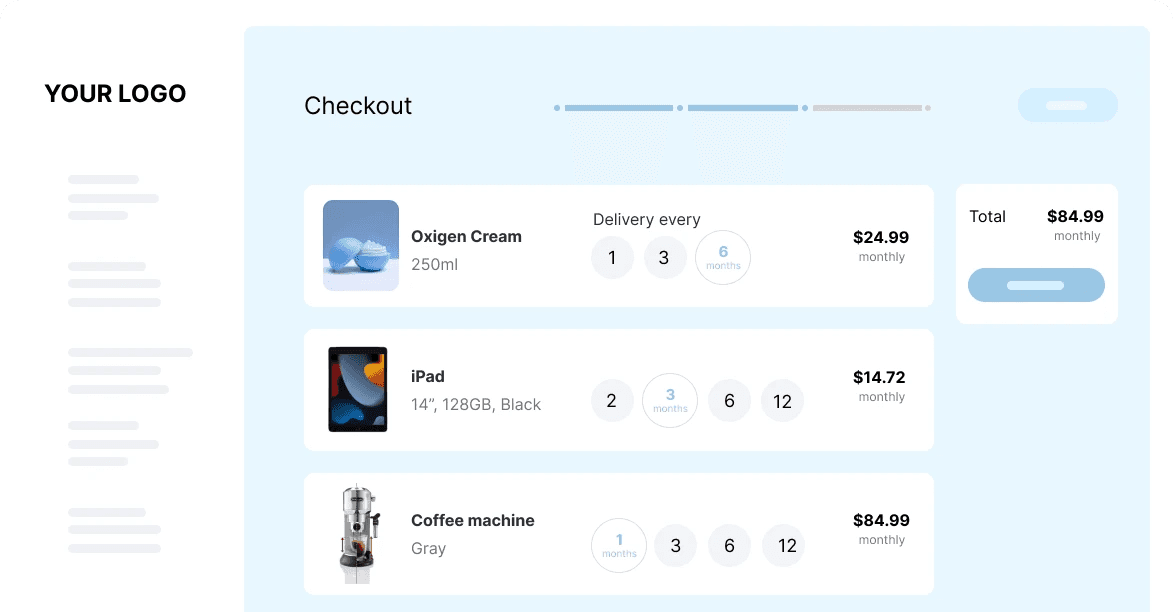
An online consumer electronics store wanted to reach more budget-conscious customers. They embedded a leasing option directly in their checkout process, allowing buyers to select either full payment or a monthly lease amount for each product. Customers could see how much they’d pay per month beside the “Add to Cart” button and complete a brief eligibility check with just a few extra clicks at checkout. As a result, the store noticed a sharp increase in cart conversion rates, especially for higher-end devices that might have otherwise seemed out of reach.
This screenshot illustrates how the store presents both the full purchase price and the monthly leasing rate, making the leasing offer transparent and easy to understand at the exact decision point.
B2B Solutions
A commercial equipment supplier serving small businesses incorporated leasing options for machinery and tools. At checkout, businesses can apply for leasing in a separate step, with pre-filled business information for ease. The backend seamlessly coordinates with the supplier’s leasing partner, and approvals tend to happen within minutes. Existing business customers appreciate skipping manual paperwork, and the supplier benefits from bigger average order sizes.
Service and Subscription Models
One SaaS platform lets users lease software licenses and upgrades through their billing portal. When upgrading, users see clear options for one-time payment or flexible leasing plans, with real-time adjustments based on features selected. Integration with a third-party fintech provider allows auto-renewals and easy management of ongoing “lease” terms for software access, aligning with how many customers prefer to pay for digital tools over time.
Unlocking these leasing options opens up further questions about how they function during checkout and what you can expect when setting them up in your store. Let’s explore those details next.
Frequently Asked Questions About Leasing at Checkout
Can any customer choose leasing at checkout?
Eligibility usually depends on factors like age, location, credit check, and cart value. Some stores partner with leasing providers that offer no-credit-check options, but most will need some verification before approving a lease.
How fast is the approval process?
Most leasing checkouts provide instant approvals, within seconds if the information matches up. If there’s an issue, you might be asked for more details or to try again later.
What kind of products can I lease?
Physical goods (like electronics, furniture, tools), as well as certain subscription services, are commonly leased. Some stores or platforms have rules about which items are eligible for leasing, so not everything in your cart may qualify.
Is there a down payment required?
Some leasing solutions ask for a small initial payment, while others let you walk away with zero upfront costs. It all depends on the store’s provider and your approval outcome.
Can I pay off my lease early?
Most leasing partners let you pay off early, often with a discount on fees or remaining payments. Check the lease terms at checkout or in your lease agreement.
How do returns or cancellations work on a lease?
Returning a leased item usually involves stopping the lease contract, which means returning the product and pausing further payments. The exact process, and any fees, depends on the leasing provider’s policies and the store’s return window.
Will leasing affect my credit score?
In most cases, applying for a lease involves only a soft credit check, which doesn’t impact your score. If you default or have late payments, that could be reported to bureaus, so it’s important to read the details at checkout.
What happens at the end of the lease?
Typically, you’ll have the option to buy out the product, return it, or upgrade to a newer model. Make sure you review the end-of-lease options before checking out.





💚 Don’t get left behind
Ready To Join The Circular Movement?
United for a smarter shopping experience and a better planet